

If your front door had five locks, would you really leave three of them open? That’s what most small businesses are doing online right now, and they don’t even know it. Here’s how to spot the open locks and close them, written so anyone can follow along.
Let’s Start With a Simple Picture
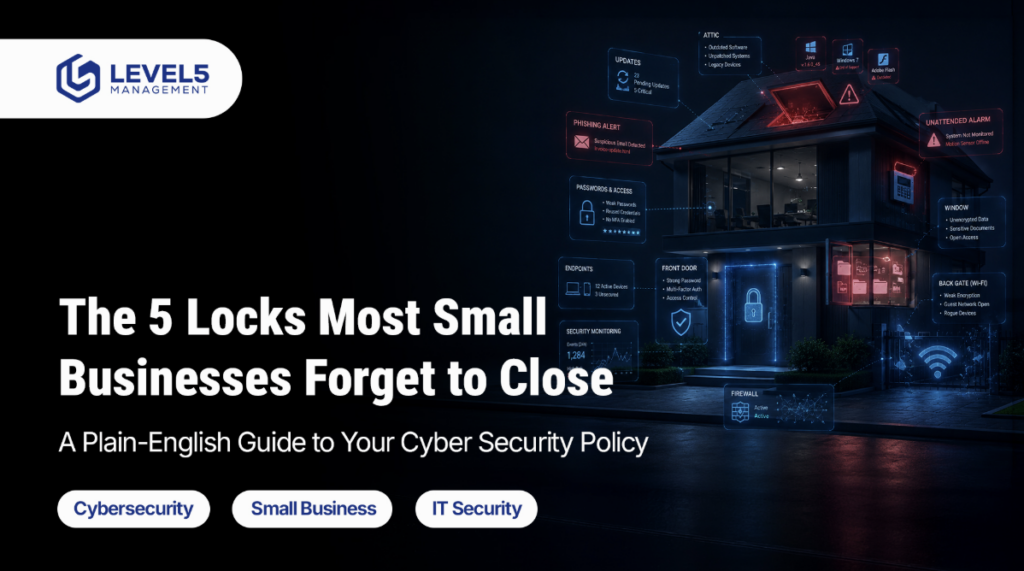
Imagine your business is a house.
- The front door is your email.
- The windows are your laptops and phones.
- The back gate is your Wi-Fi.
- The attic is the old software nobody updates.
- The alarm system is supposed to tell you when something’s wrong.
Here’s the problem we see every week at Level5 Management when we walk into businesses across Boca Raton, West Palm Beach, Palm Beach Gardens, Jupiter, Delray Beach, Boynton Beach, and Fort Lauderdale:
The front door has a shiny new lock. But the windows are open, the back gate is broken, the attic hasn’t been checked since 2019, and the alarm is beeping into an empty room at 2 a.m.
On paper, the house looks secure. In real life, a burglar just needs to try a few windows.
That’s what happens when a cybersecurity policy for a small business gets built one piece at a time instead of as a real plan. The good news? You don’t need to be a tech expert to fix it. You just need to check the right five locks.
Why This Matters More in 2026 Than It Did Last Year
Two quick facts no jargon:
- A global report from the World Economic Forum says 94% of security leaders believe AI is the biggest force changing cybersecurity right now. Translation: the bad guys are using AI to write better fake emails, faster and cheaper than ever before.
- IBM’s 2025 report found that 63% of companies that got hacked had no real plan for AI or new tech. They just hoped nothing would go wrong.
So if your plan today is “we have antivirus and a firewall,” you’re playing a 2015 game against a 2026 opponent.
We already broke down how criminals are turning tools like Claude AI into weapons in this earlier post on AI-powered cyber threats. This article is the other side of that coin, what you can actually do about it, starting this week.
The One Rule That Makes Everything Easier
Before the five locks, here’s the mindset shift that changes everything:
Stop thinking about tools. Start thinking about questions.
Every good security plan answers six simple questions:
| The Question | What It Really Means |
| Who’s in charge? | When something goes wrong, who makes the call? |
| What do you own? | Do you know every computer, phone, and login your business uses? |
| What’s locked? | What’s stopping a bad guy from getting in? |
| Would you notice? | If someone broke in tonight, when would you find out? |
| What do you do? | In the first hour of a problem, who does what? |
| How do you bounce back? | How do you get back to normal and prove it to clients? |
Most small businesses are decent at “what’s locked.” They’re weak on the other five. That’s where the missing locks live.
Lock #1: A Front Door Stronger Than a Password + Text Code
In plain English: You’ve probably been told to turn on “two-step login” a password plus a code sent to your phone. That was great advice in 2018. In 2026, criminals can steal those text codes in about 10 minutes using tools they buy online for $30.
What it looks like in real life: An employee gets an email that looks like a Microsoft login page. She types her password and her text code. The hacker copies both in real time and is inside your email before she finishes her coffee.
How to close this lock:
- Use a small USB security key (think of it like a physical house key for your login) or a passkey, the face or fingerprint login built into modern laptops and phones. These can’t be copied by a fake website.
- Find and remove any “temporary” exceptions from years ago. We find these in almost every audit.
- Train your front desk or help desk to call a known number back before resetting anyone’s login. Never reset just because someone knows a birthday.
Why you should care: If you run a law firm, a CPA practice, or a wealth advisory in South Florida, a stolen login equals stolen client data, which equals state bar complaints, HIPAA fines, or FINRA trouble. Fixing just this one lock stops most small-business break-ins cold.
Lock #2: Know Which Devices You Actually Trust
In plain English: Right now, somewhere in your company, an employee is checking work email on their teenager’s gaming laptop. Or on a phone that hasn’t been updated since 2022. Or on a spouse’s iPad at the beach.
Every one of those is a door into your business. And you don’t even know the door exists.
What it looks like in real life: A bookkeeper’s kid downloads a free game on the family laptop. The game quietly steals saved passwords. That night, Mom logs into QuickBooks Online from the same laptop. Monday morning, a $48,000 wire is gone.
How to close this lock:
- Write down, on one page, what counts as a “trusted device.” Example: Owned by the company or enrolled in our security system. Encryption turned on. Screen locks after 15 minutes.
- Block untrusted devices automatically. Don’t rely on reminders, they get ignored.
- For personal phones, put work email inside a protected “bubble” that can’t leak into personal apps. (Your IT partner can set this up in under a day.)
This is the single biggest gap we find in managed IT for property management companies and wealth firms, because field staff and remote workers quietly drift outside the rules.
Lock #3: Email That Protects Itself (Because Humans Click)
In plain English: Email is still how 8 out of 10 hacks start. If your only defense is “we told our team not to click weird links,” you’re betting on every person paying perfect attention forever. That bet loses.
What it looks like in real life: A fake email “from the CEO” hits the controller’s inbox at 4:47 p.m. on a Friday. It asks for a $92,000 wire to a new vendor “before the weekend.” It even copies the CEO’s writing style (thanks, AI). The controller wires the money. The CEO finds out Monday morning.
How to close this lock:
- Set up a tool called DMARC on your email. In plain English, it’s a bouncer that stops fake emails pretending to be from you. If your current IT team doesn’t know what DMARC is, that’s your sign to call us.
- Turn on impersonation protection inside Microsoft 365. It’s literally a checkbox, and most businesses have never flipped it.
- Make one rule, in writing: any change to wire instructions, payroll, or vendor bank info must be confirmed by a phone call to a known number. No exceptions.
- Make reporting a suspicious email one click. Thank people who report them. Never shame anyone who clicks by mistake.
That one phone-call rule has saved Level5 clients millions in fraud losses. It costs nothing to set up.
Lock #4: Keep Everything Updated (And Actually Prove It)
In plain English: Every app on your computer gets “updates.” Those aren’t just new features. Most updates are patches that fix holes hackers already know about. Skip the updates, and you’re leaving holes wide open.
What it looks like in real life: Your accountant’s PDF reader hasn’t been updated in 18 months. A client sends a normal-looking PDF. Opening it installs ransomware. By morning, every file in the office is locked, and the criminals want $80,000 to unlock them.
How to close this lock:
- Set rules for how fast updates get applied: critical ones within 3 days, important ones within a week. Write the rules down.
- Update everything, not just Windows. That means Chrome, Zoom, Adobe, accounting software, legal software, the PDF reader, all of it.
- Keep a short list of “we couldn’t update this yet and here’s why.” Review it every month so nothing sits forever.
- Once a month, save proof that updates happened. When insurance renewal or a client audit comes, you’ll be the hero with receipts.
Most Boca Raton and West Palm Beach businesses we check think they’re up to date. Fewer than 1 in 10 can prove it.
Lock #5: Know What to Do in the First Hour
In plain English: An alarm is useless if nobody’s listening. A fire extinguisher is useless if nobody knows where it is. Security alerts work the same way. Most businesses have them. Very few have a plan for what to do when one goes off.
What it looks like in real life: At 2:14 a.m. on a Saturday, ransomware starts locking files. The security software sends an alert to a shared inbox nobody checks until Monday. By then, it’s over.
How to close this lock:
- Have a real person watching security 24/7 either through your IT company’s security team, or a partner service. Nights and weekends are exactly when attacks happen.
- Write down, in plain English, what to do in the first hour for the top five situations: ransomware, fake CEO email, stolen laptop, suspicious login, and an employee who clicked something. One page per situation. That’s it.
- Test your backups every 3 months. Actually restore a file. If you’ve never restored one, you don’t have backups, you have hope.
- Once a year, hold a “what would we do if…” meeting with your leadership team, your lawyer, and your IT partner. 60 minutes. Coffee. No slideshow needed.
This is the heart of our vCISO service and the piece most cybersecurity companies in Boca Raton and West Palm Beach skip, because it’s less flashy than selling a new firewall.
A 10-Question Self-Check: How Many Locks Are Open?
Answer yes or no. Three or more “no” answers mean you have real exposure that should get fixed this quarter.
- Every boss and admin in our company uses a security key or passkey not just a text code.
- The old-style login methods on Microsoft 365 are completely turned off.
- We have a written, one-page rule for what counts as a “trusted” work device.
- Personal phones that touch company email are enrolled in a security system we control.
- We have DMARC set up on our email to stop people from faking our domain.
- Any wire, payroll, or vendor bank change requires a phone call to a known number in writing, no exceptions.
- We patch Chrome, Zoom, Adobe, and our business apps on a set schedule not “whenever.”
- We can show proof that last month’s updates actually happened.
- A real human watches our security alerts 24 hours a day, 7 days a week.
- We’ve restored a real file from backup in the last 90 days.
Scoring:
- 9–10 yes: You’re in strong shape. Use a yearly check-up to stay there.
- 6–8 yes: You have real exposure. One or two projects will fix most of it.
- 5 or fewer yes: You’re one bad click away from a serious incident. Don’t wait for the incident to prove it.
How Level5 Management Closes These Gaps for South Florida Businesses
Since 2008, Level5 has been the trusted IT and cybersecurity partner for law firms, CPAs, wealth advisors, property management companies, and nonprofits across Boca Raton, West Palm Beach, Palm Beach Gardens, Jupiter, Delray Beach, Boynton Beach, Royal Palm Beach, Riviera Beach, North Palm Beach, South Palm Beach, Loxahatchee Groves, Lake Worth, Fort Lauderdale, and Miami.
Here’s what we do, in plain English:
- Free IT Risk Assessment we walk your business, find the open locks, and hand you a prioritized list. No pressure, no tech-speak.
- vCISO (Virtual Chief Information Security Officer) executive-level security leadership for a fraction of a full-time hire.
- 24/7 monitoring and response real humans watching your alerts, nights and weekends included.
- Compliance help for HIPAA, SOC 2, FINRA, and the FTC Safeguards Rule built into how we work, not bolted on.
- Dark web monitoring, phishing drills, and security training your team will actually finish.
- Backup and disaster recovery we test every quarter because an untested backup is just a guess.
We don’t sell fear. We sell clear answers, written proof, and peace of mind so your next client audit, insurance renewal, or regulator conversation is the easiest meeting on your calendar.
Ready to See Which of Your Locks Are Open?
Book a free 30-minute call with Level5 Management. We’ll walk through your setup, point out the biggest gaps, and give you a plain-English action list, whether you decide to hire us or not.
👉 Schedule Your Free IT & Security Assessment 📞 Or call us directly: (561) 509-2077
Because in 2026, the businesses that win aren’t the ones with the fanciest tools. They’re the ones with every lock closed.
Frequently Asked Questions
Get answers of your frequently questions asked questions regarding The 5 Locks Most Small Businesses Forget to Close
What is a cybersecurity policy for a small business, in plain English?
It’s a short written document that says who can use what, how your team logs in, what to do when someone clicks a bad link, and who’s in charge when something goes wrong. Think of it as the “house rules” for your technology. Three core pieces cover most of it: an Acceptable Use Policy (how employees should use tech), an Access Control Policy (who can see what), and an Incident Response Policy (what to do when something goes wrong).
How much does a cybersecurity risk assessment cost in South Florida?
For most small and mid-sized businesses in Palm Beach and Broward counties, a professional assessment runs between $2,500 and $15,000, depending on your size and which rules you have to follow (HIPAA, SOC 2, FINRA, etc.). Level5 offers a free IT risk assessment for qualified businesses in Boca Raton, West Palm Beach, Palm Beach Gardens, Jupiter, Royal Palm Beach, Riviera Beach, North and South Palm Beach, Loxahatchee Groves, and Lake Worth.
How should a company handle a ransomware attack?
Four steps. One: Disconnect affected computers from the network. Two: call your IT partner and your cyber insurance company before anyone else. Three: never pay a ransom without a lawyer involved. Four: restore from backups you’ve actually tested. The most important part? Have this written down before the attack happens. During an attack, nobody thinks clearly.
Why is authentication important for a business?
Because over 80% of break-ins involve stolen or weak passwords. Strong authentication, like a security key or a passkey, shuts that door. It’s also now required by most cyber insurance companies, so it saves you on premiums too.
What are the benefits of passwordless authentication?
Three big ones. It’s safer because fake login pages can’t steal a fingerprint or a physical key. It’s faster, no more resetting passwords every 90 days. And its friendlier employees actually like it, which means they actually use it.
Do small businesses really need 24/7 IT support and monitoring?
Yes, because attackers specifically target nights, weekends, and holidays when they know nobody’s watching. A 24/7 helpdesk and security operations team means a break-in gets caught in minutes, not on Monday morning.
What’s the difference between regular IT support and a vCISO?
Regular IT support keeps your computers running. A vCISO (virtual Chief Information Security Officer) is a senior security leader who sets your strategy, handles compliance, and talks to your insurance company and auditors on your behalf. You get executive-level expertise without hiring a full-time executive.
Article written by the Level5 Management team. Level5 Management is a Boca Raton-based managed IT, cybersecurity, and compliance partner serving small and mid-sized businesses across South Florida since 2008.
