

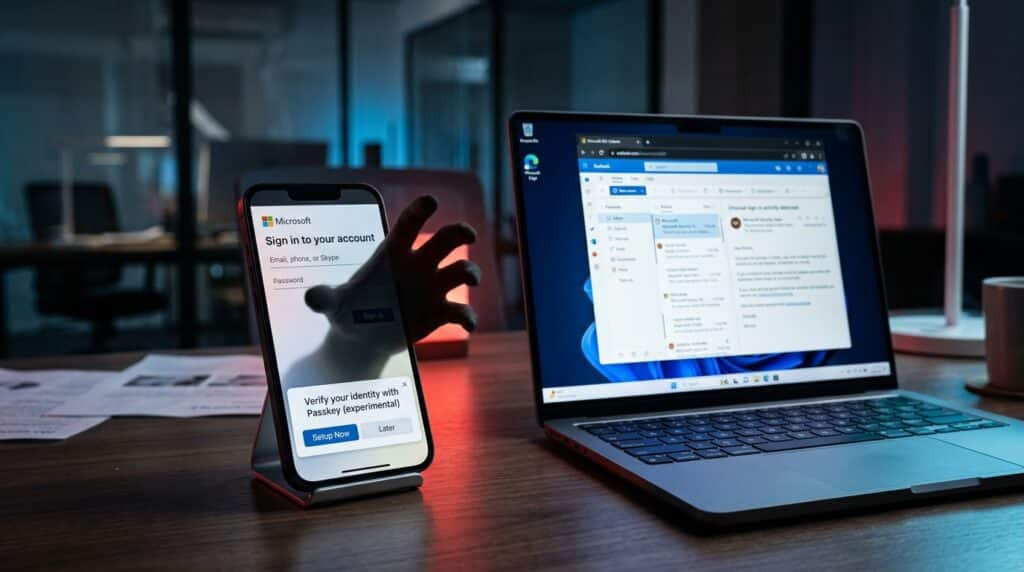
Passkeys were supposed to be the fix. The whole point of moving to passkeys was to eliminate phishing. No more stolen passwords. No more SMS code interceptions. Just a cryptographic key tied to your device that’s mathematically impossible to steal remotely.
And that part is true. Passkeys themselves are phishing-resistant.
But the process of setting them up is not.
And that’s exactly where attackers are getting in.
Since May 2026, Microsoft has been tracking a campaign where threat actors impersonate IT help desk staff, call employees on their personal phones, and convince them to “set up their passkey” on a fake website. The victim thinks they’re upgrading their security. In reality, they’re handing over their entire Microsoft 365 account.
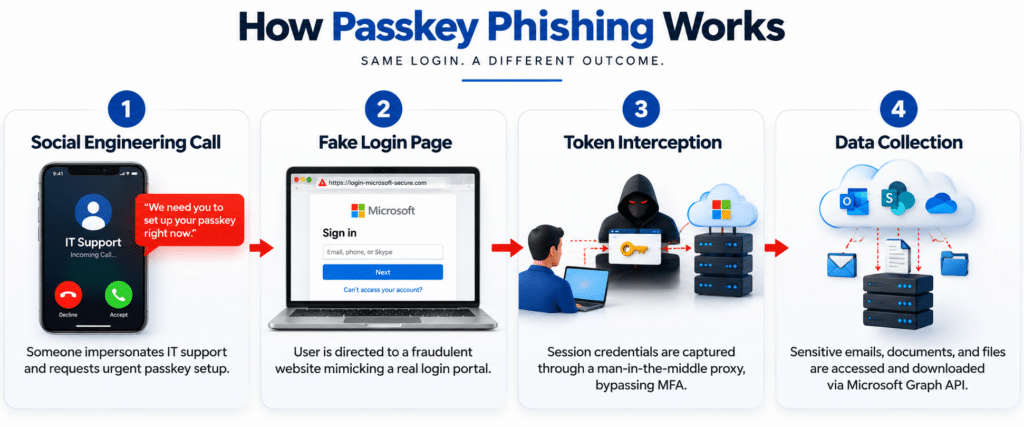
“The 4-step passkey phishing attack: vishing call → fake login → token interception → data exfiltration”
How Passkey Phishing Works (Step by Step)
This isn’t your typical “click a bad link” phishing. It’s a multi-stage social engineering operation, and it’s effective because it exploits something your employees already expect: requests to update their authentication.
Step 1: The Phone Call
An attacker calls an employee’s personal phone, posing as the company’s IT help desk. They sound professional. They know the employee’s name, their department, maybe even their manager. They tell the employee they need to update their passkey or MFA settings immediately otherwise, they’ll lose access to their account.
The urgency is manufactured. But it works because every company is rolling out passkeys right now, and employees have been conditioned to expect these requests.
Step 2: The Fake Website
The employee receives a text message (to their personal device, not their work email; that’s intentional) with a link to “complete the passkey setup.” The site looks exactly like a Microsoft login page.
It’s not.
The attackers register domains designed to look legitimate. Microsoft flagged these in the wild:
- passkeyhelpdesk[.]com
- secure-passkey[.]com
- setupmypasskey[.]com
- add-passkey[.]com
- integratedsso[.]com
- syncmykey[.]com
They even use the target company’s name as a subdomain, so an employee at “Acme Corp” might see acmecorp. setupmypasskey[.]com. It looks real.
Step 3: The Token Hijack
Here’s where the technical sophistication kicks in.
The attacker isn’t stealing the passkey itself; that’s cryptographically impossible. Instead, they’re using the fake site as an adversary-in-the-middle (AitM) proxy that sits between the employee and Microsoft’s real login page. The employee authenticates normally. The attacker captures the session token.
In some cases, they use device code authentication flows; the employee is tricked into entering a code on a legitimate Microsoft page that unknowingly authorizes the attacker’s device.
Either way, the result is the same: the attacker has a valid session token that bypasses MFA entirely.
Step 4: The Takeover
Once inside, the attacker moves fast:
- Registers their own MFA method (phone number, authenticator app, or OTP token) so they can get back in anytime
- Uses the Microsoft Graph API to inventory users, groups, permissions, and accessible content
- Downloads files from SharePoint and OneDrive in bulk
- Collects emails, folders, and attachments from Exchange Online
- Rotates IP addresses across the attack to avoid detection
- Exfiltration lasts from several hours to multiple days
By the time anyone notices, the attacker has persistent access and has already copied everything worth taking.
Sources: Microsoft Security Research (Sept 2026), The Hacker News, Mandiant/Google
Why This Attack Is So Effective
This isn’t working because employees are careless. It’s working because the attack is perfectly timed.
Every company in America is rolling out passkeys right now.
Microsoft, Google and Apple are all pushing passwordless authentication. Your employees have been told, repeatedly, that they’ll need to set up passkeys. So when someone calls pretending to be IT and says “it’s time to set up your passkey,” it doesn’t feel suspicious. It feels expected.
The attackers also target personal phones, not work email. That’s deliberate. Work email goes through spam filters, secure gateways, and IT monitoring. A text to someone’s personal phone doesn’t.
And the final piece: the attackers do their homework. Microsoft’s report notes that they “invest heavily in pre-attack research” pulling employee names, org charts, and reporting structures from LinkedIn and other public sources. When the call comes, it sounds like it’s coming from someone who actually works at your company.
It’s Not Just Passkey Phishing There’s a Million-Email CEO Fraud Campaign Too
In the same disclosure, Microsoft documented a separate campaign that sent over one million scam emails between August 3–5, 2026.
The emails impersonated CEOs of target companies and tried to convince accounts payable departments to initiate ACH wire transfers for a fake ServiceNow subscription.
The scary part:
- AI-generated email templates tailored to each target
- Fabricated invoices with supporting email threads to make them look legitimate
- Spoofed CEO signatures with real names and email addresses pulled from public sources
- Targeted IT services, consumer goods, real estate, and manufacturing companies in the U.S.
This wasn’t a spray-and-pray phishing blast. It was a coordinated, AI-assisted impersonation campaign designed to bypass human skepticism by layering multiple fake “proof points” into a single email thread.
Source: Microsoft Security Blog (Sept 10, 2026)
Two Campaigns, One Lesson
Passkey Phishing | CEO Invoice Fraud | |
Attack Vector | Phone call + fake website | Email impersonation |
Target | Individual employees | Finance / accounts payable |
Goal | Hijack Microsoft 365 account | Wire transfer fraud |
AI Used? | Pre-attack reconnaissance | AI-generated email templates |
Bypasses MFA? | Yes, captures session tokens | N/A, social engineering only |
Scale | Targeted (individual calls) | Mass (1M+ emails in 3 days) |
What Your Business Needs to Do Right Now
1. Tell your team: IT will never call your personal phone to set up a passkey
This is the single most important message you can send company-wide. The attack starts with a phone call. If employees know that real IT would never do this, the attack fails at step one.
2. Block device code authentication flows
In Microsoft Entra (formerly Azure AD), you can use Conditional Access policies to block device code flows entirely. This eliminates one of the two main technical mechanisms these attackers use. If your IT team hasn’t done this yet, it should be done this week.
3. Enforce device-bound passkeys only
Don’t allow fallback methods during passkey enrollment. If your enrollment process lets someone “skip” to SMS verification or a legacy MFA prompt, attackers will exploit that fallback. Configure your identity provider to only accept FIDO2 hardware keys or device-bound passkeys with no alternatives.
4. Monitor for unauthorized MFA registrations
The clearest indicator of compromise in these attacks is a sign-in from an unfamiliar device immediately followed by the registration of a new authentication method. If your SIEM or monitoring tools aren’t flagging this pattern, you have a blind spot.
5. Audit Microsoft Graph API activity
Microsoft explicitly flagged that these attackers use the Graph API for reconnaissance and data exfiltration. A single user suddenly querying thousands of files across SharePoint and OneDrive via Graph is not normal behavior. Make sure your security team is monitoring for it.
6. Restrict personal device enrollment
The attackers sign in from unmanaged personal devices. If your Conditional Access policies allow sign-ins from any device, you’re making their job easier. Require device compliance or managed device status for access to sensitive resources.
THE BOTTOM LINE
Passkeys are still the right direction. They are phishing-resistant when implemented correctly. But the transition period right now, while companies are rolling them out is exactly when attackers strike. They’re not breaking the technology. They’re exploiting the human process around it. The fix isn’t to abandon passkeys. It’s to lock down how they’re enrolled, train your people to recognize the social engineering, and monitor for the specific patterns these attackers leave behind. The technology is sound. The implementation gap is where you’re exposed.
Frequently Asked Questions
Q: What is passkey phishing?
A: Passkey phishing is a social engineering attack where threat actors impersonate IT help desk staff and trick employees into visiting fake Microsoft login pages under the pretense of setting up or updating their passkey. The attackers don’t steal the passkey itself they capture session tokens through adversary-in-the-middle techniques or device code authentication flows, bypassing MFA entirely.
Q: Can passkeys be phished?
A: Passkeys themselves are cryptographically phishing-resistant; they cannot be intercepted or replicated remotely. However, the enrollment process and fallback authentication methods can be exploited. Attackers use the transition to passkeys as a pretext to trick users into authenticating on fake sites, where session tokens are captured.
Q: How do I protect my Microsoft 365 accounts from passkey phishing?
A: Key protections include: blocking device code authentication flows via Conditional Access policies, enforcing device-bound passkeys with no SMS/legacy fallbacks, monitoring for unauthorized MFA registrations after sign-ins, auditing Microsoft Graph API activity for bulk file access, and training employees that IT will never call personal phones to set up passkeys.
Q: Who is behind the passkey phishing attacks in 2026?
A: Microsoft attributes the activity to multiple threat actors, including Storm-3121 and Storm-3032 (also tracked as UNC6671 by Mandiant). These groups are associated with the ShinyHunters and Helix extortion brands and share overlapping phishing infrastructure and voice-phishing (vishing) techniques.
Level 5 Management helps businesses across South Florida secure their Microsoft 365 environments, implement phishing-resistant authentication, and build security infrastructure that can handle the threats that exist right now not the ones from three years ago. If you’re not sure whether your passkey rollout is locked down, let’s talk.
